
Introduction
Ok, in this second episode it is time to create a first module. What we will learn in this episode:
- a module EXPORTING things (the interface)
- a consumer IMPORTING a module
- 2 types of source files (regular / module)
- primary module interface unit
- BMI (built module interface)
- scanning for module users and providers
- CMake: FILESET CXX_MODULES
- CMake: CMAKE_CXX_SCAN_FOR_MODULES
Our starting example, old style
In our first example, we will keep things very trivial:
- not using any std types or functions, meaning nothing to include
- application consisting out of main.cpp, and the (header) file making up the module (conceptually the application contains the library)
- we will consider that ‘module’ to be the counterpart of a header only library (as mentioned not a real library yet).
We have the following structure in the traditional header way:
- Numbers.h : 2 functions, implemented inline, and using a helper function, which is not intended to be used by the callers (as such by convention put in a “Details” namespace)
- main.cpp: includes that header, uses the 2 functions, but also uses the ‘forbidden’ helper function (aka “Hyrum’s Law” at play)
- CMakeLists.txt
The source files look like:
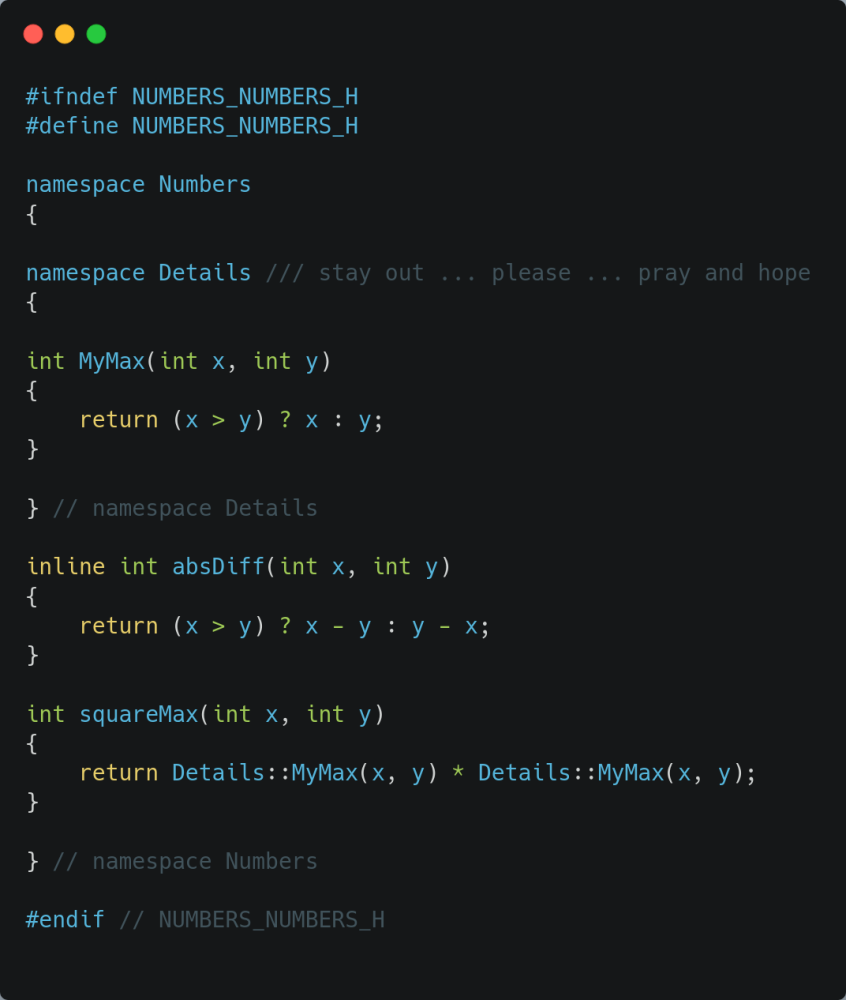
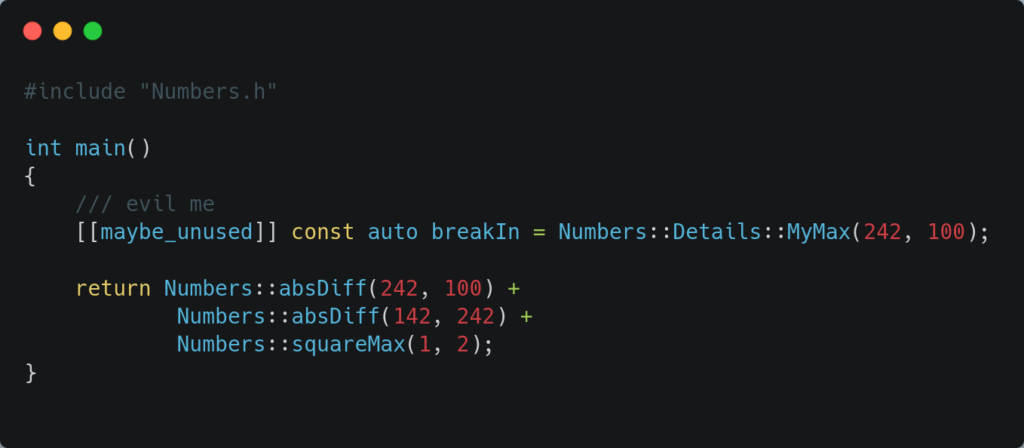
When we migrate that into modules, it is obvious the header file disappears, and we put something else in place. On the topic of file extensions for module files, it is not worth the trouble (since not standard and confusing), so we use .cpp for all source files.
We will put the (module) code in a file called “Numbers.cpp”.
As a module
A source file, can be in the picture for modules in different ways, keeping things simple for now, we consider:
- exporting the module
- importing a module
- implementing a module
and some legal combinations of those. In our little example, our Numbers.cpp is a combination of exporting and implementing.
First of all, the name of a module does NOT introduce a namespace. The name is just an identifier, and after importing, all exported entities are available in the namespace they originally lived in. So creating a module can be seen as boxing the entities, and importing as unboxing, but once that is done, the box is gone.
CMake
Let’s first have a look on the build system, and how we need to give CMake a little hand. As far as CMake is concerned we need to tell it which source files are “module source files” instead of “regular source files“. Those are the files which either:
- contain an ‘export module’ directive
- are a module partition (we ignore this for now)
We do this by enumerating them in a FILE_SET of type MODULES in target_sources(…).
CMake also needs to know who is importing modules obviously, that is done by scanning, a task done in collaboration with the compiler. So that a build system can be generated correctly specifying the dependencies and the order of build steps. A module needs to be build first (it’s BMI created) before it can actually be imported/consumed. We will come back on that scanning later on. A consequence of this is, the easy parallel compilation of source files is now constrained and some serialization/ordering needs to be put in place.
This results in the following CMakeLists.txt. We mention all the source files in 1 action:
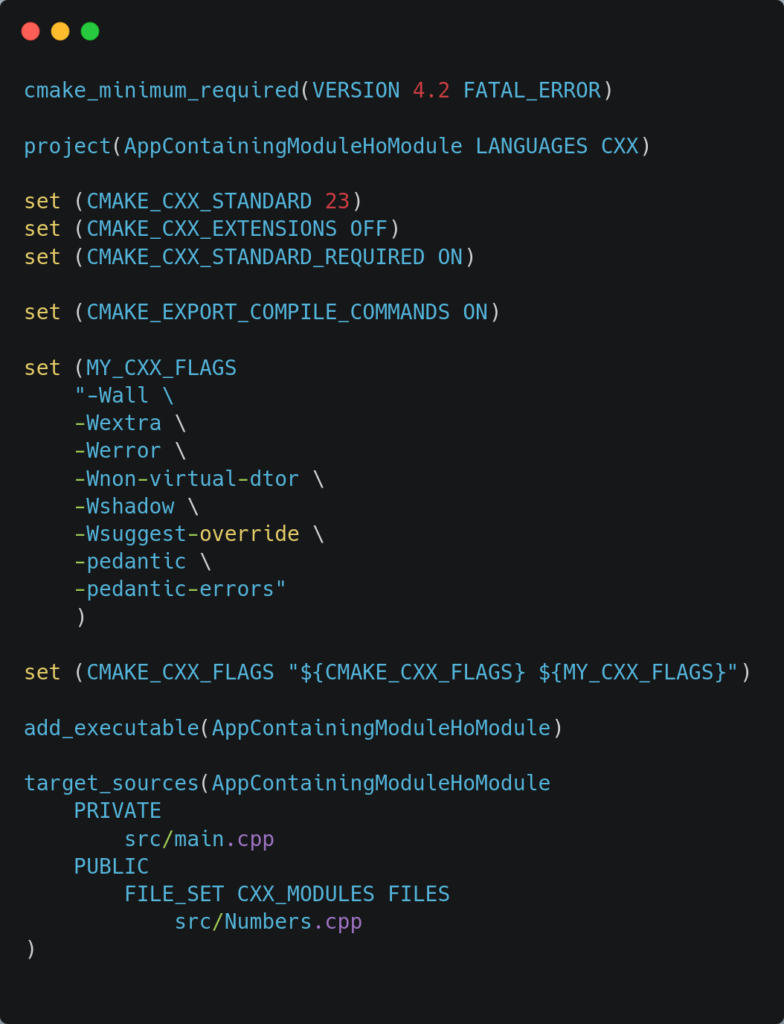
We create a FILE_SET of type CXX_MODULES, and list the ‘module source’ FILES. In our case, the Numbers.cpp, which we will create now.
The module: Numbers.cpp
Here’s the code, let’s dissect it:
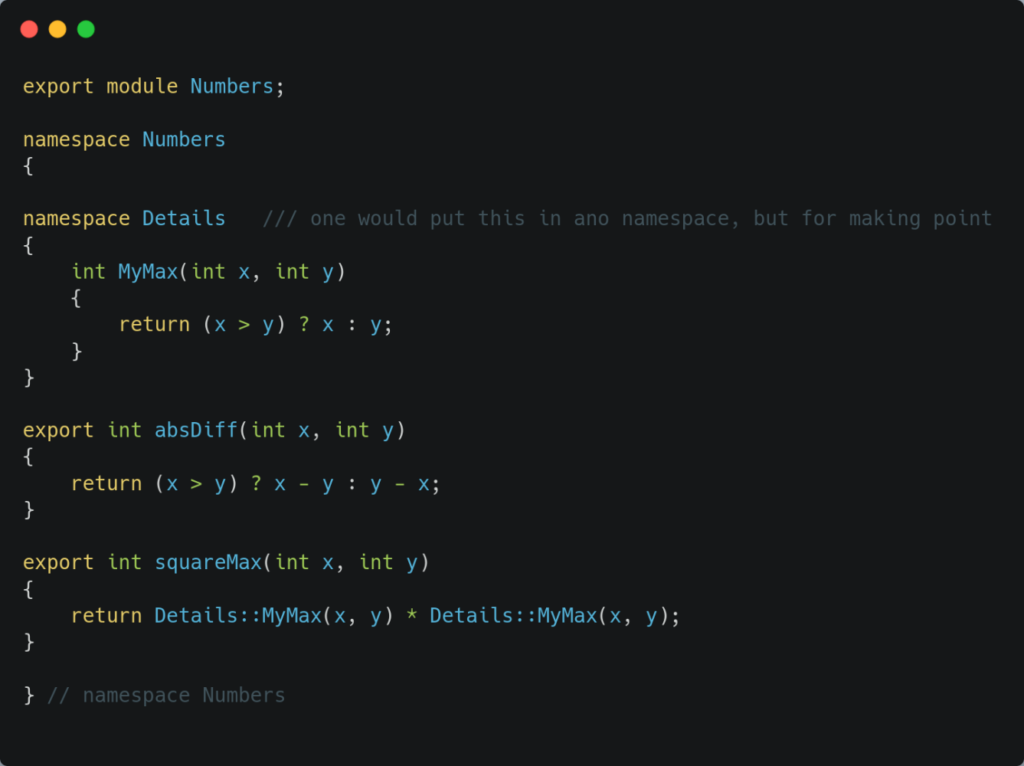
What can we learn from our “first little module” (things can be more sophisticated, but that is for a next episode).
- the module is declared by “export module Numbers;“
- all stuff coming after that export directive is called the “module purview“
- each function, struct, class that one wants to export needs to be explicitly mentioned as “export“, otherwise it is just internal implementation detail (in our case, our 2 public functions). Note, one can also export a namespace.
- a module MUST have exactly 1 “primary module interface (unit)”, this file will lead to 2 artifacts: the BMI (built module interface), this is the actual interface, the item used by the consumer, and it is no longer textual (precompiled declarations, including generic code). The second artifact is a regular TU (translation unit) on its own, which gets compiled into a regular object file (eg containing also the not exported items, the definitions, …)
- all other module implementation units (we don’t have any here, see a next episode) get this full content at their disposal automatically, so both the exported and not exported items
- an outside consumer only gets the exported items (our main.cpp down below)
Something we will come back on, all names in the purview of the module are attached to the module. For now we will not give much attention to this.
The consumer: main.cpp
Let’s turn our attention to the consumer of our little module.
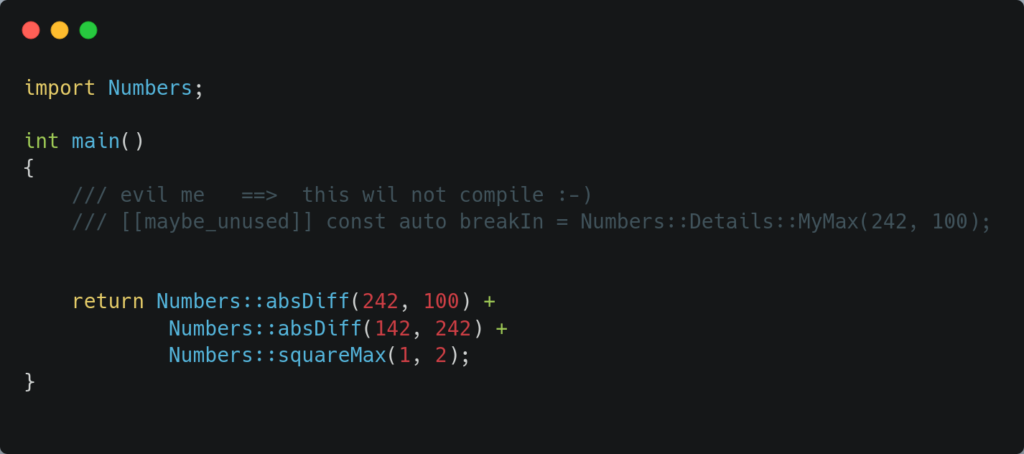
When we look at main, we have to comment out our offending use of the ‘internal helper method’, because we did not export it. This is already a first extra benefit of modules, these kind of “Details” patterns are now really hidden and not reachable.
Further observations at main.cpp:
- the include directive is gone
- we import the module: “import Numbers;“
Building time
Step 1: generating the build system, no surprises there (so not showing the output):
cmake -D CMAKE_BUILD_TYPE=Release -G Ninja -S. -B build/ReleaseStep 2: building the module, and it is interesting to look at the output, I redacted it a little bit, and added some comments, to identify the different sections.
cmake --build ./build/Release/ --verbose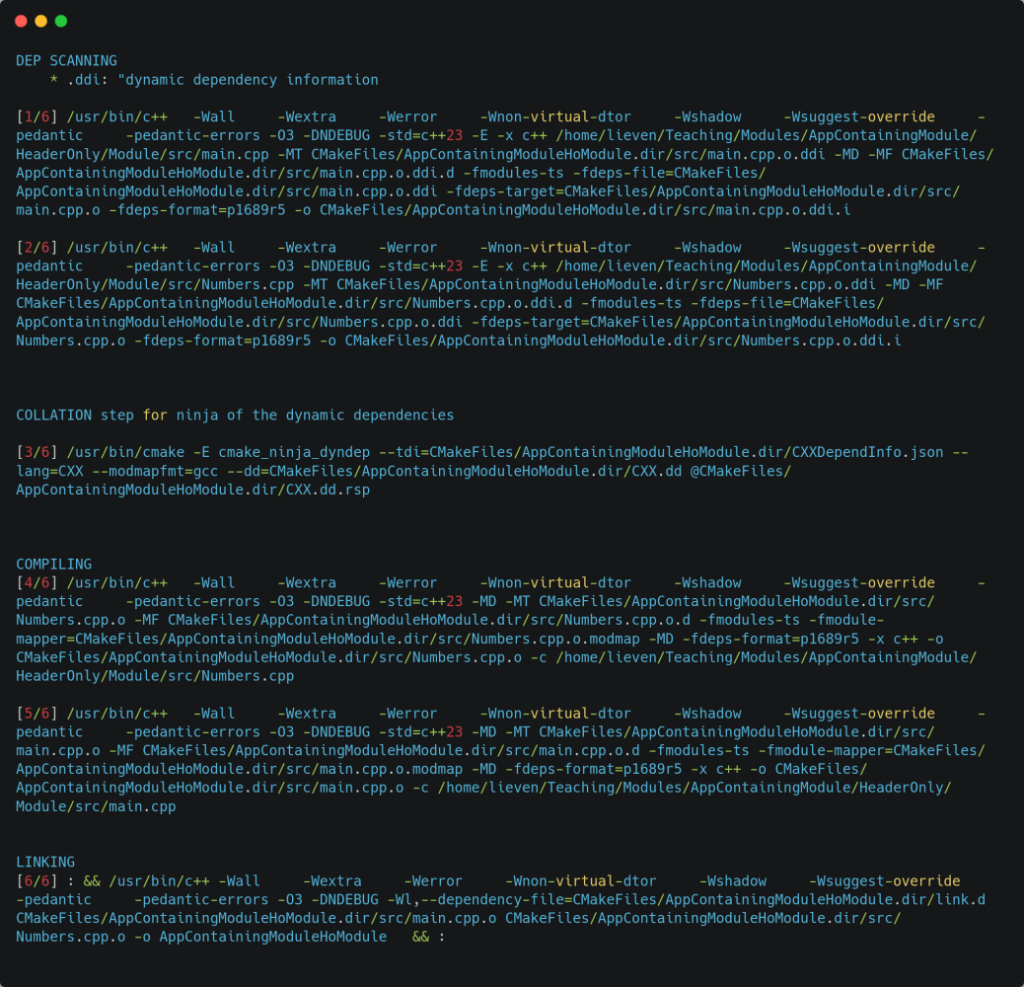
What are those 4 sections ?
- Dependency scanning, where are the imports (and exports), all source files are inspected
- Collation: the results from the previous step are bundled together
- Compilation of the source files
- Link the executable
Scanning
We mentioned before that CMake and the compiler work together to carry out scanning for “imports of modules”. This is activated the moment the system is configured to be at standard C++20 or later (on systems supporting modules, so this is not the case for Makefiles).
This also means that libraries, executables not using modules will carry out this scanning, as we can see from the build output shown below (for our traditional header based example).
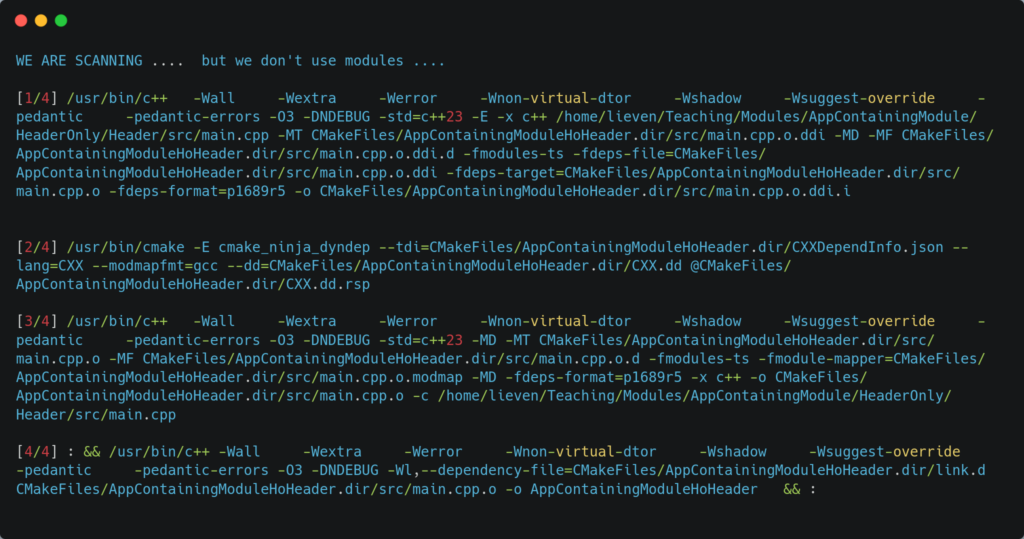
If you don’t want that scanning to happen, you can disable it, by either per target (or even per source file) turning it off (or even globally if you know your entire codebase is not using modules):
- global way: set (CMAKE_CXX_SCAN_FOR_MODULES OFF)
- per target/source way: set the property ‘CXX_SCAN_FOR_MODULES‘ to OFF
From CMake reference manual:
- CXX_SCAN_FOR_MODULES is a boolean specifying whether CMake will scan the source for C++ module dependencies.
- Scanning for modules in sources belonging to file sets of type CXX_MODULES is always performed.
When we turn it off globally on our traditional example we get:
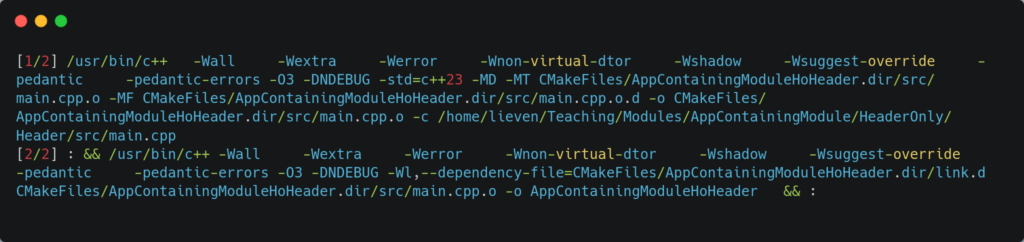
Recap
This concludes our first module example, we learned a few things about exporting/importing (and importantly ‘not exporting things’), the collaboration with CMake and scanning.
We know what the primary module interface is, and what the BMI is.
What’s up in the next episode ?
We will turn the contained library into a real library, and we will have a module implementation unit (aka a file implementing the module, and not having any export directives).
And we will also further play with that library, to have multiple module implementation units.
Stay tuned.
PS: some further info on that scanning/cmake/ninja
cmake_ninja_dyndep is an internal CMake command used during the build process when employing the Ninja generator to manage dynamic dependencies, particularly for C++20 modules and Fortran modules. It enables CMake to scan source files, determine module dependencies, and update the build graph on-the-fly, allowing Ninja to compile files in the correct order.
Here’s a breakdown of its purpose and function:
Handling C++20 Modules: In C++20, modules must be built in a specific order (the module interface must be compiled before any file that imports it). cmake_ninja_dyndep works with Ninja’s dyndep feature to scan files for import and export statements and injects these dependencies into the Ninja build graph, which cannot be determined until the code is partially compiled.
The Process:
* Scanning (.ddi files): CMake triggers a scan to find what modules a file needs and provides.
* Collation (cmake_ninja_dyndep): This command reads the scan results (.ddi files) and generates dyndep files, which tell Ninja which modules need to be built before others.
* Compilation: Ninja uses the information to run the compiler in the correct order.
Leave a Reply