

I know, I am busy writing on modules, but reflection is so important and powerful, I have to write something about that first. So I choose a little practical example for making your custom types printable.
Our Mission
The challenge of this article is to write a universal printer/formatter, so that we can format (nearly) any type we have.
By that we mean, print out the values (and names) of all its members. This includes also the members of base classes.
Let’s get started.
The Lift operator
The first thing we need to do is moving from the code domain to the reflection domain, and that is done by applying the “lift operator” (^^) to a certain type.
Say we have our play type “Coordinate”:
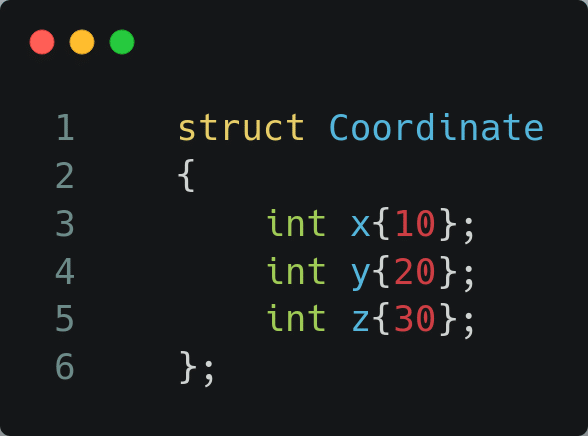
let’s reflect on it by: ^^Coordinate
This gives us an object of type std::meta::info, and this contains a lot of information we can inspect by calling several inspection/reflection methods.
The members of a struct
We can query for all the members of a struct/class by calling the “nonstatic_data_members_of()” method. This method requires the “std::meta::info” we obtained by reflecting, and also a second argument. We will see later on, what we can do with that second argument. For now let’s pass “std::meta::access_context::current()“.
constexpr auto ctx = std::meta::access_context::current();
nonstatic_data_members_of(^^Coordinate, ctx);Let’s store the outcome of that method in an array, so we can loop over it, we stuff them in a static array:
std::define_static_array(nonstatic_data_members_of(^^Coordinate, ctx));And we can loop over it, in a range based for loop style, only we don’t use a regular for, but the template for.
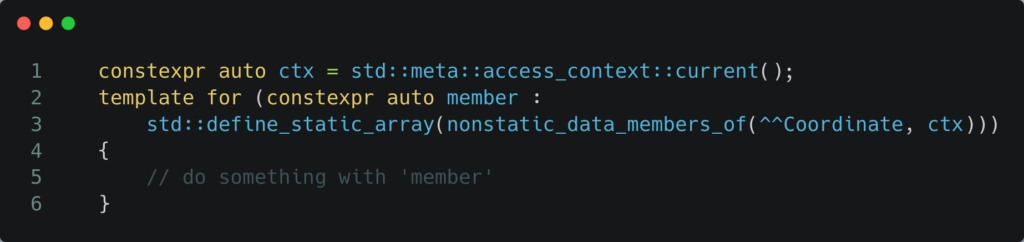
‘member’ is the meta info on each member of our struct. This means we can inspect that, by using other methods.
A few things come to mind, which are useful for our goal:
- the name of the member: identifier_of(member)
- the value of the member: hmmmmm, there is no method for this.
Alright, we can not inspect the value during reflection (compile time) since the value will be determined at run-time, so we need to switch back from the reflection domain to the code domain, and use our regular specification, that is done by using the splice operator: [: :].
So on our instance (co) of our type (Coordinate) we need to mention the correct member, something like “t.x” or “t.y”, so x or y, but what are we looking at during the template for loop, we look at ‘member’, so let’s switch that ‘member’ back to the code domain with the above mentioned operator: [:member:], giving a statement like: t.[:member:]
Putting these things together we end up at:
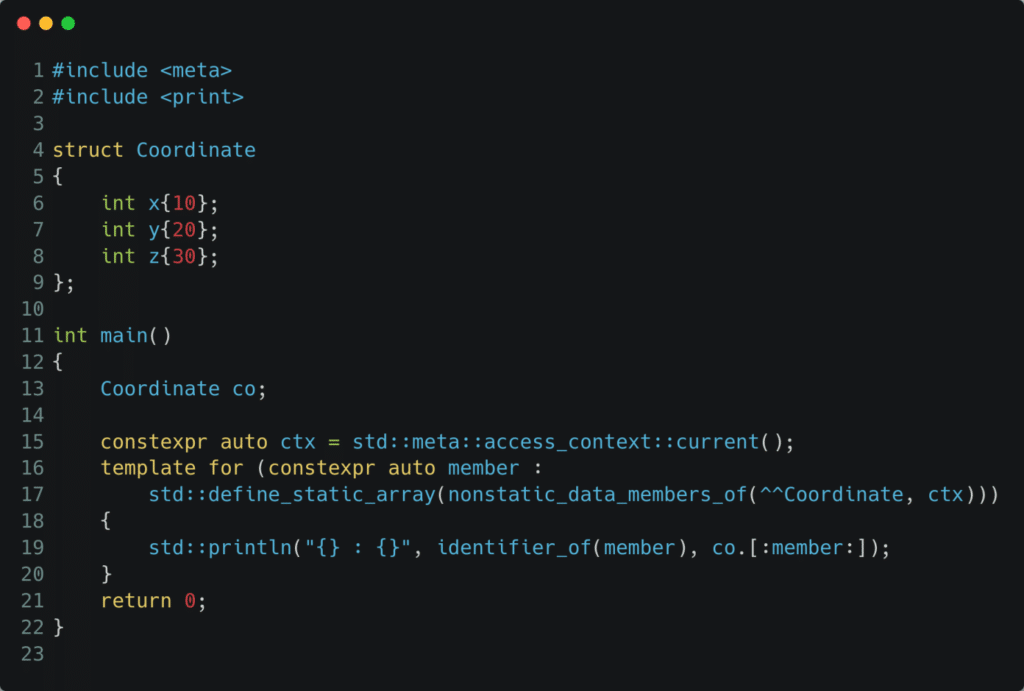
This gives the following output:
x: 10
y: 20
z: 30Well look at that 🙂
See this live at: https://compiler-explorer.com/z/31qhbxMc8
Different types of access_context
Let’s make a little change, and make the z coordinate “private”:
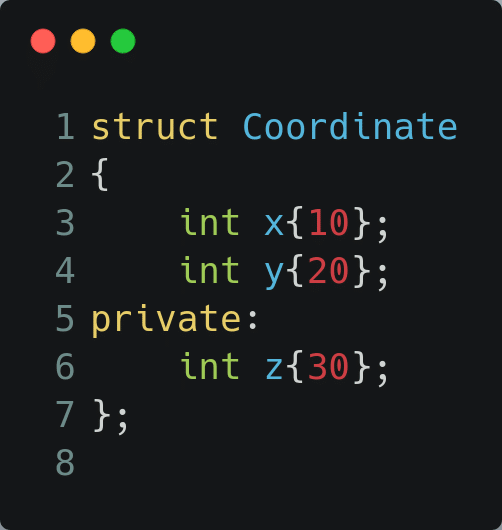
Now our output becomes:
x: 10
y: 20See this live at: https://compiler-explorer.com/z/Tax1K7YbY
So we don’t get the private members anymore, with our “current()” context. In order to get them back we need to use a different access_context: unchecked()
constexpr auto ctx = std::meta::access_context::unchecked();And now we have our full output again.
See this live at: https://compiler-explorer.com/z/qK91qP71e
Custom formatter
With the above test program we have put down the basics for implementing a custom formatter for our Coordinate, and more generic for any type. So let’s implement a custom formatter, which can be used as follows:
Coordinate co;
const auto asString = std::format("{}", co);
std::println("{}", co);We need to implement 2 methods for a custom formatter for our type T:
- parse
- format
The first one is very easy, we will not support any format specifiers and as such our parse implementation is:
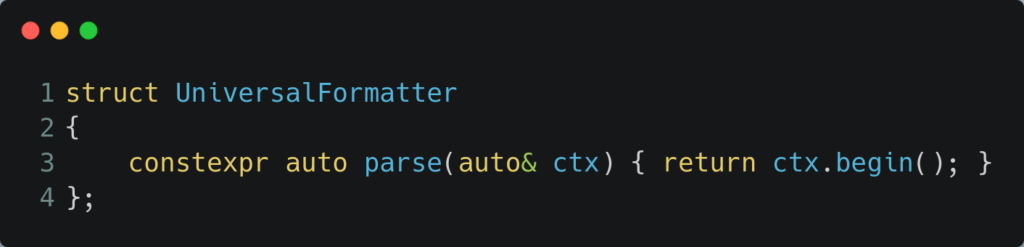
Next up is the format method:
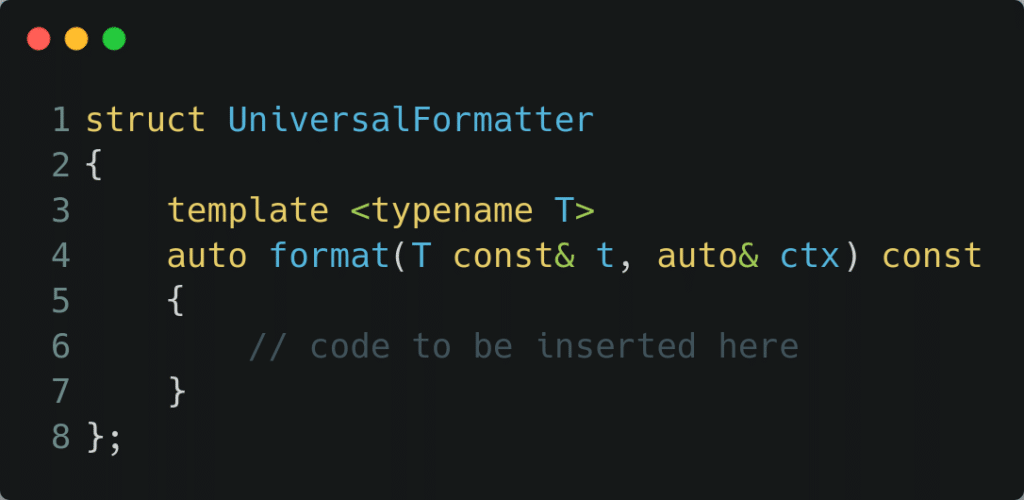
2 things to observe:
- we go for fully generic ‘ctx’ via auto (meaning not restricting to just ‘char’ based stuff)
- for the first parameter we use the traditional template way (so we have a name for our type (T) )
We have to print a lot of things during the format, for that purpose we make a reference to the output iterator of the format context:
auto out = ctx.out();And several std::format_to calls will use it.
We will print everything on 1 line, and members are separated by a comma, but we want to avoid a leading or trailing comma. So in our loop we will start by putting the comma, unless it is the very first member.
This can be solved with a lambda, that holds the state ‘to know if it is the first time or not’, and puts the comma (or not) in the out (which it captures by reference):
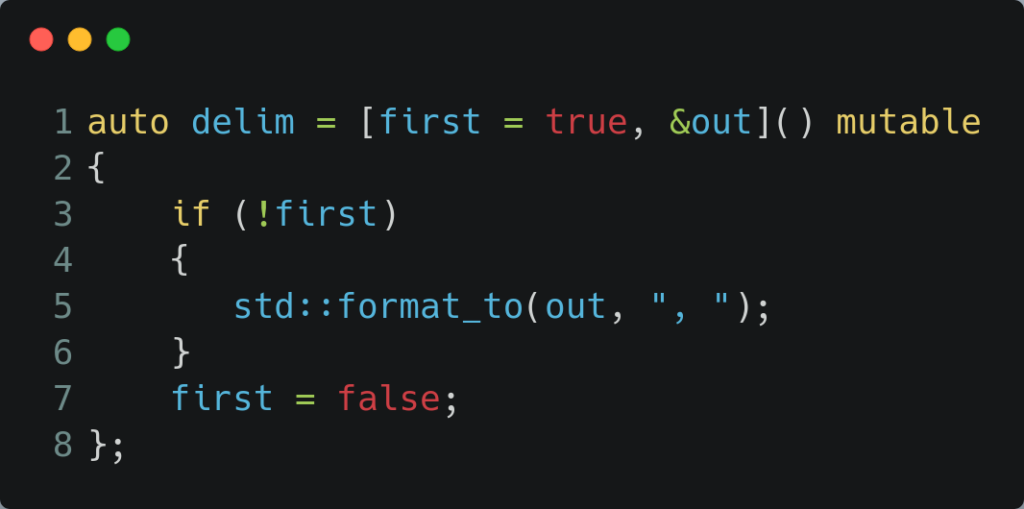
Putting some things together:
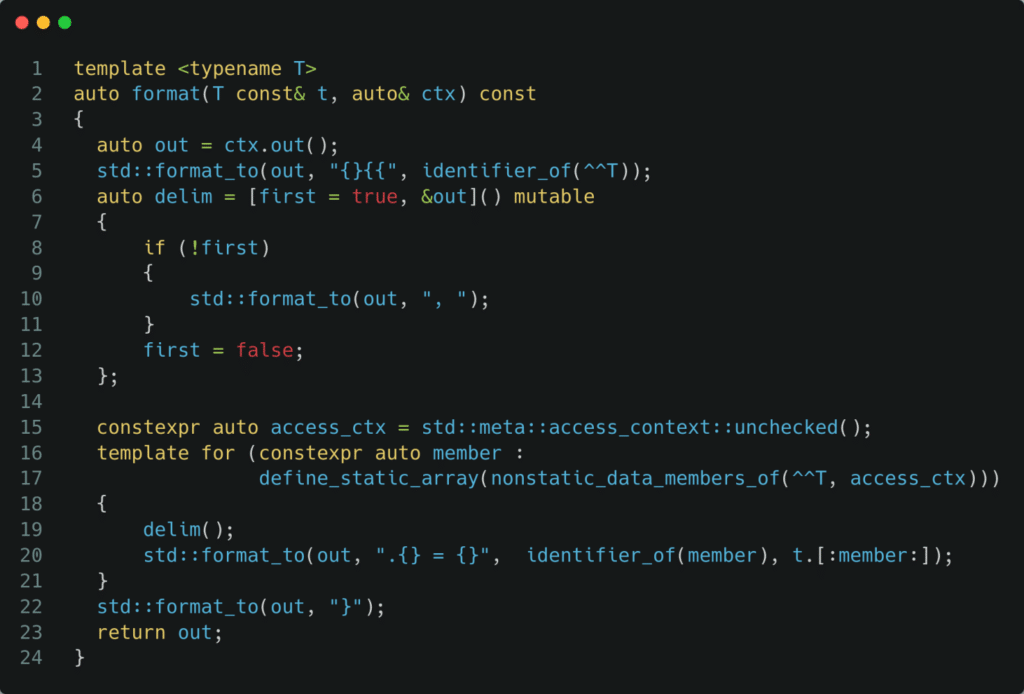
Below is the entire code example, we have created, and as an extra we created another struct “CoordinatePair” which contains 2 Coordinate members and a double. We are printing out a Coordinate struct, and CoordinatePair struct (the latter of course requires the former to be formattable”.
Notice how we need to ‘unlock’ the formatter for each type we want to use it for:
template <> struct std::formatter<Coordinate> : UniversalFormatter { };

template <> struct std::formatter<CoordinatePair> : UniversalFormatter { };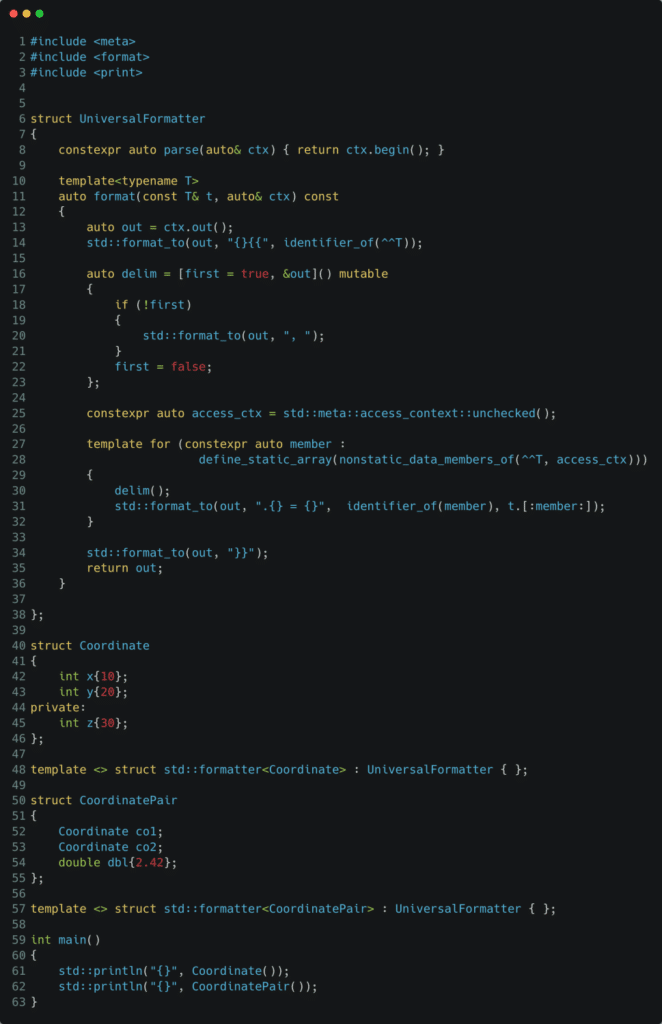
See it live at: https://compiler-explorer.com/z/aGTjseG11
It gives the following output:
Coordinate{.x = 10, .y = 20, .z = 30}
CoordinatePair{.co1 = Coordinate{.x = 10, .y = 20, .z = 30}, .co2 = Coordinate{.x = 10, .y = 20, .z = 30}, .dbl = 2.42}Inheritance
When printing a derived class, we want the base class members also to be part of it. So we need to reflect/inspect over the base classes. This can be done by fetching those via the method: bases_of(^^T, access_ctx)
Again an access_ctx comes into play (public versus private inheritance). Re-applying the recipe for looping over the members, but now over the ‘bases’, we have:

We are casting our instance ‘t’ to the base class. But that requires we know the type of the base class (in the code world), which is given to us by: type_of(base) and next we splice that one back into the code world. Note the keyword ‘typename’ which is needed here.
Don’t forget to have custom formatters for the 2 base types:
template <> struct std::formatter<Base1> : UniversalFormatter { };

template <> struct std::formatter<Base2> : UniversalFormatter { };This is our updated code example:
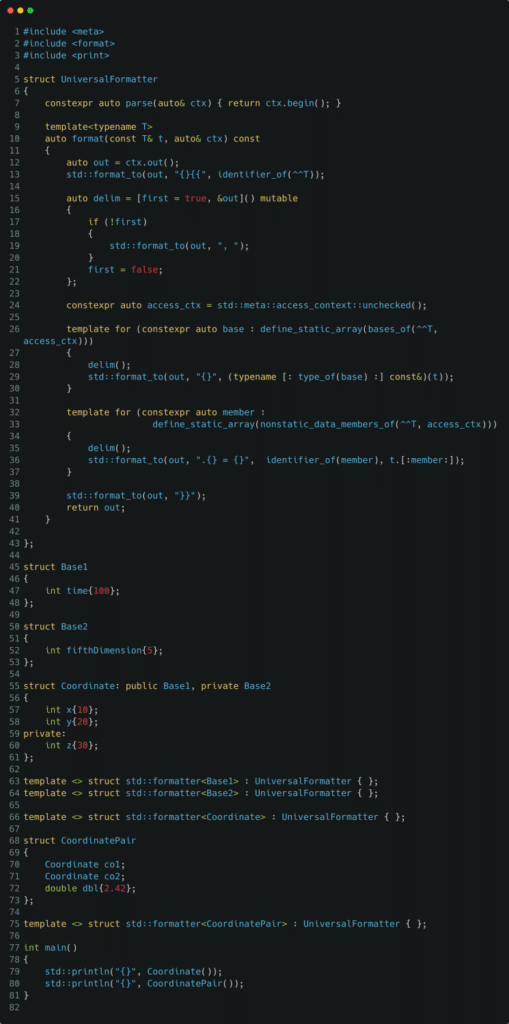
See this live at: https://compiler-explorer.com/z/c9znYKx44
It gives the following output:
Coordinate{Base1{.time = 100}, Base2{.fifthDimension = 5}, .x = 10, .y = 20, .z = 30}

CoordinatePair{.co1 = Coordinate{Base1{.time = 100}, Base2{.fifthDimension = 5}, .x = 10, .y = 20, .z = 30}, .co2 = Coordinate{Base1{.time = 100}, Base2{.fifthDimension = 5}, .x = 10, .y = 20, .z = 30}, .dbl = 2.42}There’s more, to be complete
What if a type does not have a name, or member does not have a name …..
Let’s create a type with no name
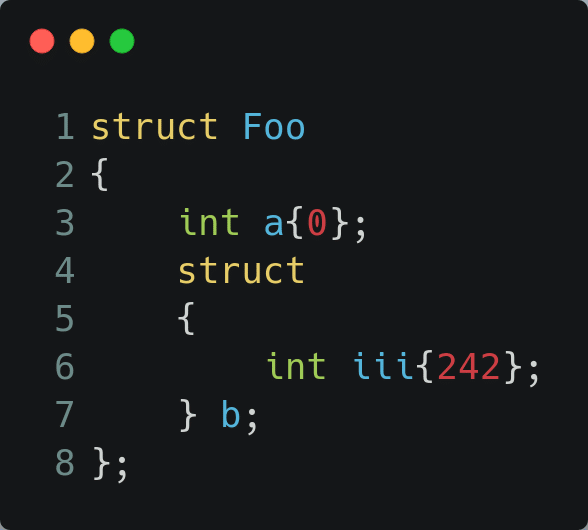
The member b, of Foo, has a type with no name. How does this print, when taking no actions.
Well, it no longer compiles: https://compiler-explorer.com/z/3aYG79hWb
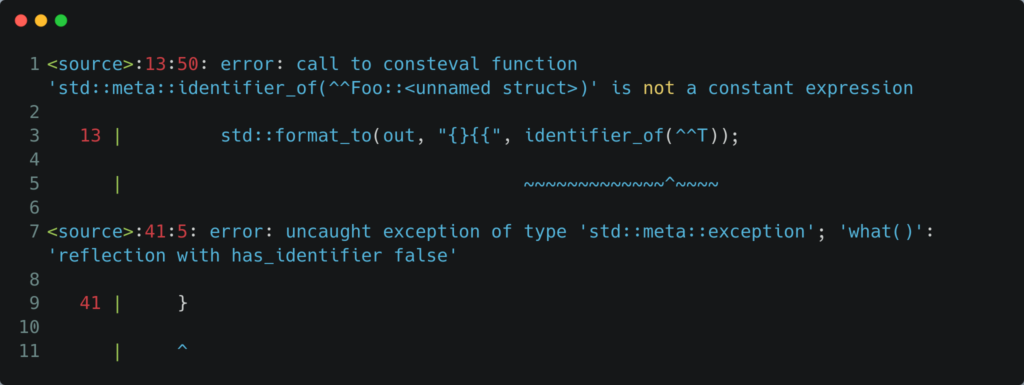
We are asking for an identifier for a type which has no identifier. Let’s agree, we will call it “unnamed” in this case. All that remains to be solved is, how do we know if there is an identifier or not ?
Maybe, just maybe, there is a method for that. Well, rest assured, there is:
has_identifier(…)
Which allows us to refactor our code at the spot where we write out the name of the type, since when that type is unnamed it does not have an identifier.
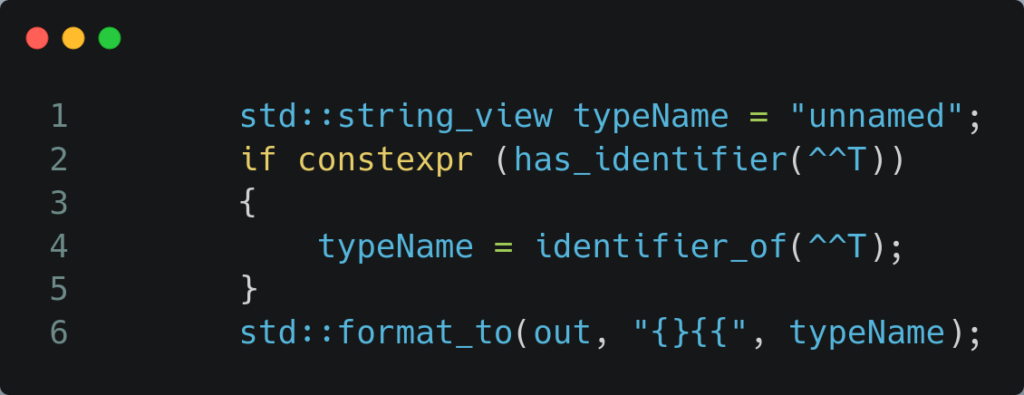
The full program looks like:
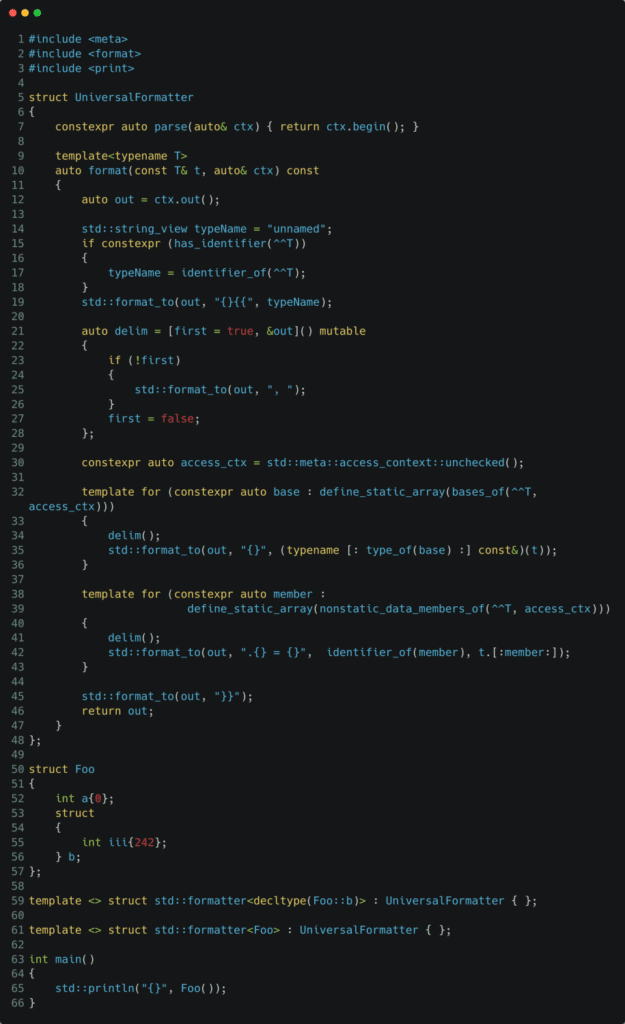

Foo{.a = 0, .b = unnamed{.iii = 242}}See it live at: https://compiler-explorer.com/z/W1snKMTrd
All that could be left is the case where a member does not have a name, aka it does not have an identifier. The use case of these seem rather exceptional (and maybe best to be avoided, anonymous structs (illegal) and anonymous unions (legal)), a such we are not adding that, and keep the code simple. In case you run into the need for this, it is not that hard to add it. Also watch out with bitfields.
Enumeration
Printing enumeration types is now also easy thanks to reflection.
Let’s consider the following enum class and struct:
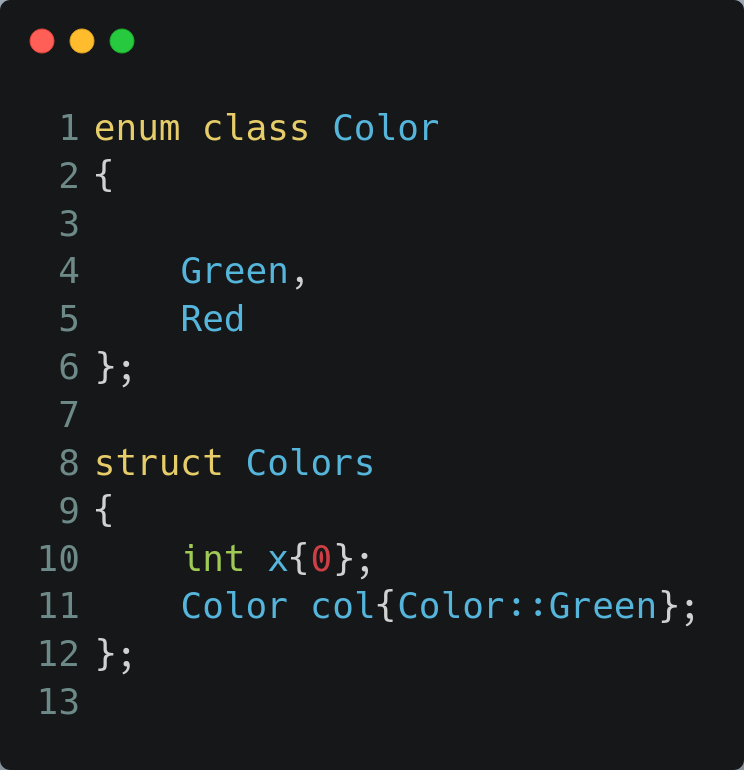
At this moment our universal printer will again run into a compile error, since the enum class type Color has no formatter. What if it could just print out ‘Green’ ?
It can, let’s create a (trivial) formatter template for enumerations:
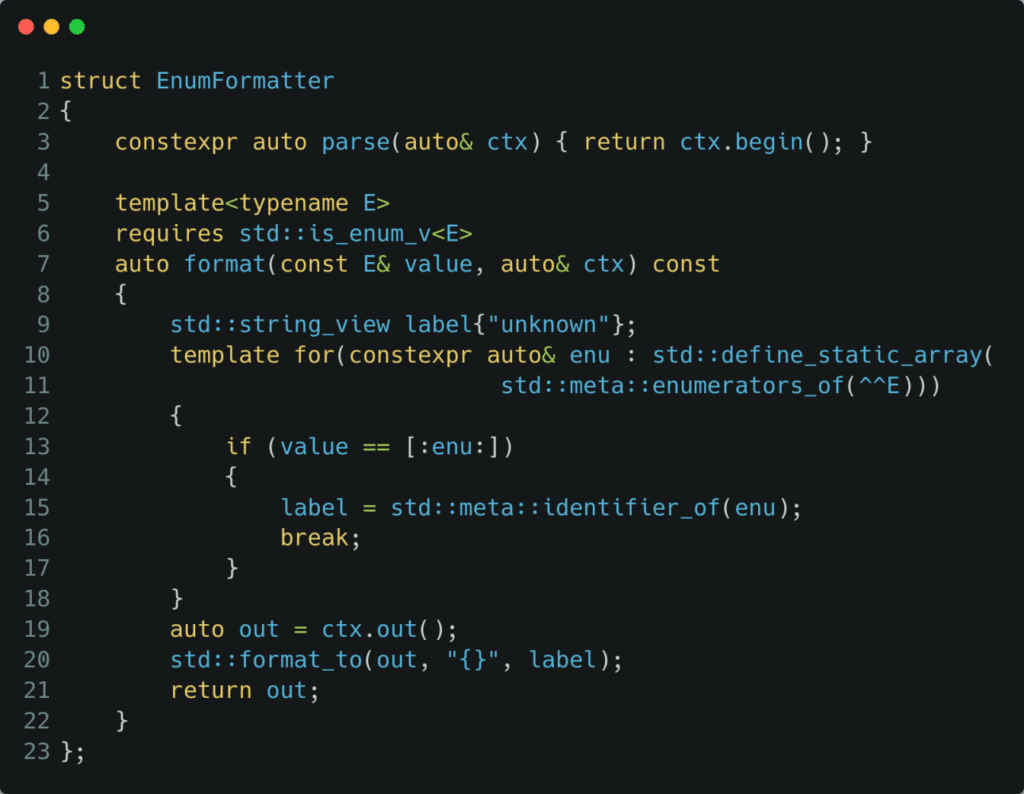
Why do I say, trivial, because again we don’t allow format specifiers, something we could easily add by inheriting from std::formatter<Std::string>.
So let’s analyze the code, some familiar and 1 new concepts pop up:
- enumerators_of() –> gives all the enumerators of an enum
- stuff them into a static array, and loop over them
- one such enumerator has an identifier, obtained by identifier_of()
- check the enumerator at hand (enu) with the actual value, so we need to splice that enumerator to bring it back in the code domain
- we protected ourselves for ‘integer values not corresponding to any enumerator’, which will result in ‘unknown’
The entire code example for this looks like:
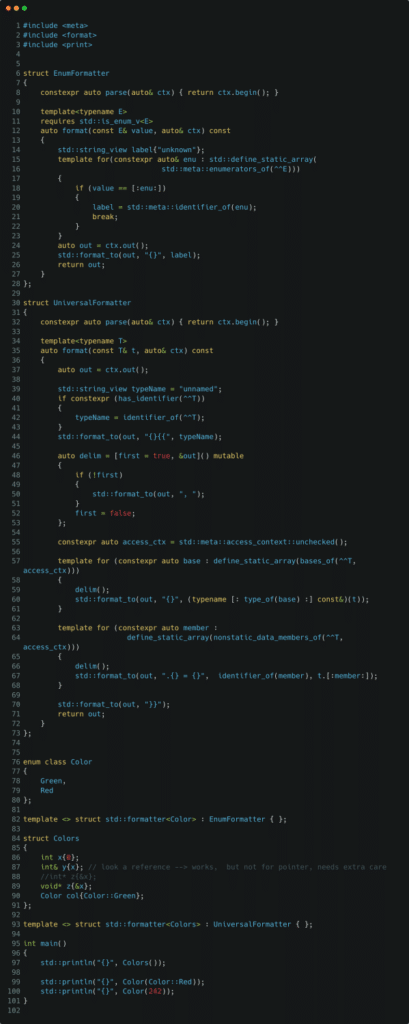
See it live at: https://compiler-explorer.com/z/qMWEhsd76
Giving the output:
Colors{.x = 0, .y = 0, .z = 0x7fff94787d40, .col = Green}
Red
unknownNote, that we also stuffed a reference in our struct, works fine. However a pointer will not work, it will need some extra care, this is due to the fact we would have for example an int*, and format only allows (const) void*. Let’s consider this a home work assignment.
Recap
We saw how we can achieve things we wanted for a long time, in a rather trivial way by reflection. Just imagine, what else can be achieved.
So we learned about:
- lift operator (^^)
- splice operator ([: :])
- define_static_array
- nonstatic_data_members_of
- bases_of
- identifier_of
- type_of
- profile context or access_context (current() and unchecked())
- has_identifier
- enumerators_of
With that we conclude our first examples of reflection. Enjoy.
Leave a Reply